An All-In-One LED Display is not just a screen — it is a complete, self-contained visual solution that rolls into position, powers on in minutes, and delivers cinema-grade image quality without external processors, cables, or technicians. In this guide, we explain what makes the plug & play All In One LED Displays different from traditional modular walls, compare the three main types (Mobile, Foldable, and Motorized), and help you choose the right system for your space.
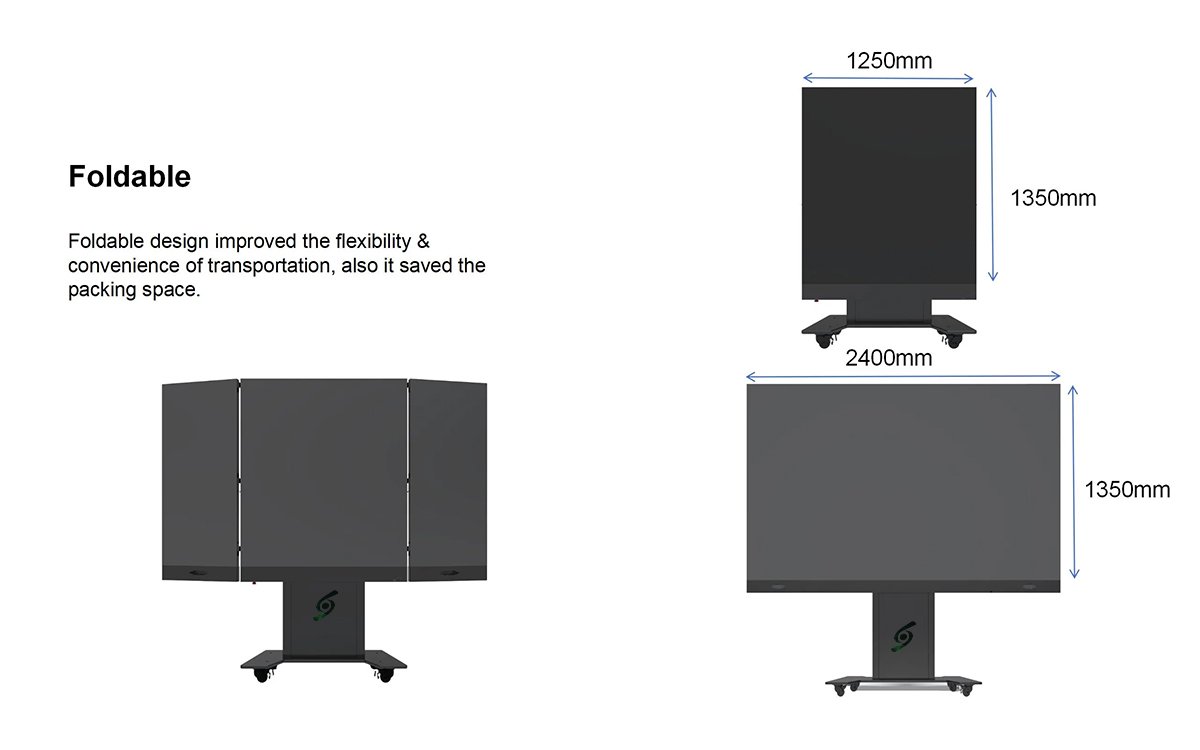
Figure 1: All-In-One LED Display types — Mobile, Foldable, and Motorized configurations
1. What are the All In One LED Displays?
Traditional LED video walls are built from hundreds of individual cabinets, each connected by data and power cables to external controllers, media players, and PCs. Installation requires trained technicians, specialized rigging, and hours of calibration.
An All-In-One LED Display eliminates this complexity by integrating four components into a single, factory-calibrated unit:
- LED Screen: High-resolution display panel with GOB or COB encapsulation, available in pitches from P0.7 to P1.8.
- Integrated Controller: Built-in receiving card and sending system — no external processor box required.
- Media Player: Onboard Android or Windows system with HDMI, USB, and wireless connectivity.
- Structure & Mobility: Precision aluminum frame with casters, foldable hinges, or motorized lift mechanisms.
The result is a display that unpacks from its flight case, connects to a single power outlet, and displays content within 10 minutes — with zero technical expertise required.
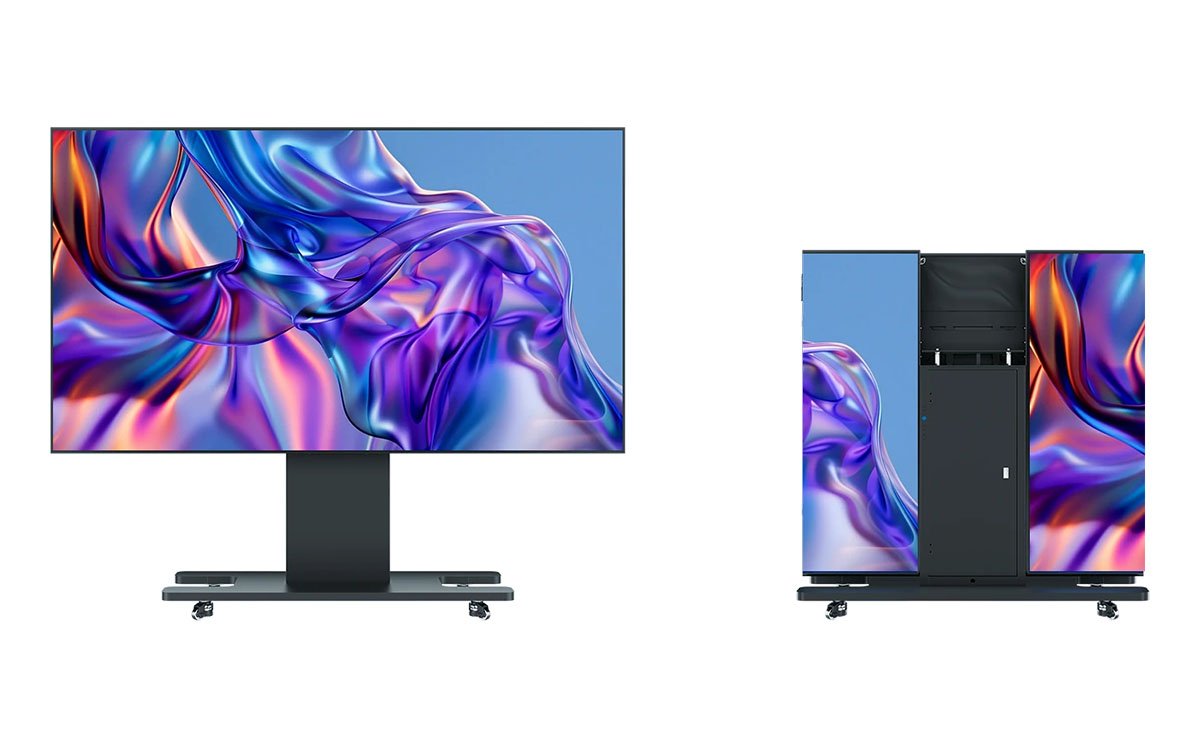
Figure 2: Foldable All-In-One LED Display — unfolds from ATA-300 flight case in under 20 minutes
2. The Three Types of All In One LED Displays
Not all All In One systems are the same. Depending on how the screen is stored, transported, and deployed, there are three distinct architectures:
Mobile All-In-One LED Display
The Mobile variant features a fixed screen mounted on a precision aluminum trolley with locking casters. The screen remains permanently attached to the frame — you simply roll it to position, lock the wheels, and power on.
Typical Specifications:
- Screen sizes: 132″ – 168″ diagonal
- Pixel pitches: P0.7, P0.9, P1.2, P1.5, P1.8
- Weight: 80 – 150 kg (including trolley)
- Setup time: Under 10 minutes
- Transport: Single flight case on wheels
Best for: Corporate boardrooms, hotel ballrooms, exhibition booths, and retail showrooms where the display moves between rooms but does not leave the building.
Foldable All-In-One LED Display
The Foldable variant addresses the single biggest limitation of large LED screens: transportation. The screen is split into two halves connected by a precision hinge. For transport, the display folds in half and stores inside its own ATA-300 rated flight case. For use, it unfolds and locks into a rigid, flat surface.
Typical Specifications:
- Screen sizes: 135″ – 162″ diagonal (unfolded); custom up to 200″+
- Pixel pitches: P0.9, P1.2, P1.5, P1.8
- Folded dimensions: Approximately 50% of screen height
- Weight: 120 – 220 kg (including flight case)
- Setup time: 15 – 20 minutes (one person)
Best for: Roadshows, touring events, pop-up retail, and mobile command centers where the display must travel by van or air freight between venues.
Motorized All-In-One LED Display
The Motorized variant adds theatrical impact to functionality. The LED screen is stored vertically inside a designer cabinet or column. At the touch of a button, a precision lift mechanism raises the screen to its full viewing height — typically in under 30 seconds. When the presentation ends, the screen descends back into the cabinet, completely hidden from view.
Typical Specifications:
- Screen sizes: 110″ – 165″ diagonal
- Pixel pitches: P0.9, P1.2, P1.5
- Lift mechanism: Electric screw or belt drive, silent operation
- Weight: 200 – 400 kg (including cabinet)
- Setup time: Zero — always installed, instant deployment
Best for: Executive boardrooms, luxury retail, hotel lobbies, and government briefing rooms where the display must be invisible when not in use.
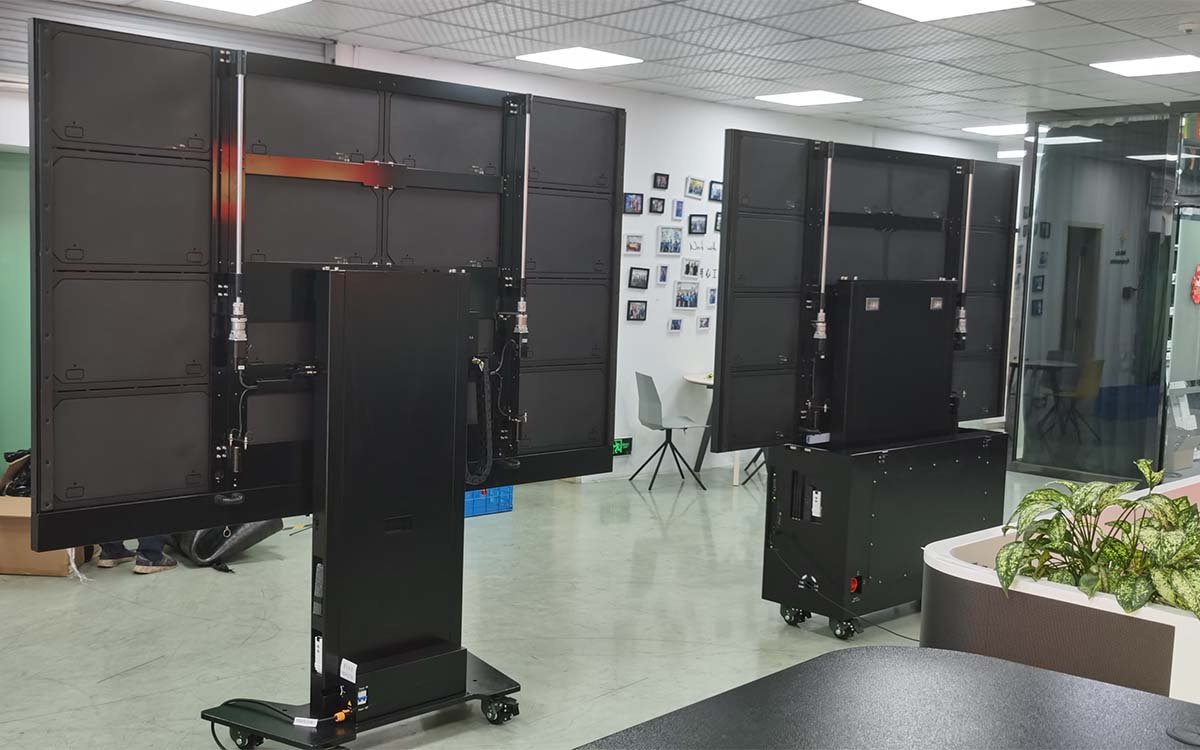
Figure 3: Motorized All-In-One LED Display — screen rises from designer cabinet in under 30 seconds
3. Head-to-Head Comparison
| Feature | Mobile | Foldable | Motorized |
|---|---|---|---|
| Transport | Trolley with casters | Flight case, foldable | Fixed installation |
| Setup Time | <10 minutes | 15–20 minutes | Instant ( motorized ) |
| People Required | 1–2 | 1 | 0 |
| Screen Size Range | 132″ – 168″ | 135″ – 200″+ | 110″ – 165″ |
| Pixel Pitch | P0.7 – P1.8 | P0.9 – P1.8 | P0.9 – P1.5 |
| Weight | 80 – 150 kg | 120 – 220 kg | 200 – 400 kg |
| Price Range (2026) | $8,000 – $25,000 | $12,000 – $35,000 | $15,000 – $45,000 |
| Best Use Case | Boardroom / Showroom | Roadshow / Event | Executive / Luxury |
4. How to Choose the Right All In One LED Displays
Step 1: Define Your Primary Use Case
| If You Need… | Choose… | Why |
|---|---|---|
| Move between meeting rooms daily | Mobile | Lightest, fastest setup, no folding fatigue |
| Ship to trade shows quarterly | Foldable | Compact flight case, airline-friendly dimensions |
| Impress C-suite visitors | Motorized | Theatrical reveal, zero footprint when stored |
| Display in a hotel lobby 24/7 | Mobile or Motorized | Mobile for flexibility; Motorized for aesthetics |
| Pop-up retail activation | Foldable | Survives transport, sets up without tools |
Step 2: Select the Right Pixel Pitch
Use the viewing distance formula: Minimum comfortable distance (meters) = Pixel pitch (mm) × 1,000
| Viewing Distance | Recommended Pitch | Application |
|---|---|---|
| 1 – 2 meters | P0.7 – P0.9 | Executive desk viewing, touch interaction |
| 2 – 4 meters | P1.2 – P1.5 | Boardroom table distance, retail counter |
| 4 – 8 meters | P1.5 – P1.8 | Conference hall, exhibition booth backwall |
| 8+ meters | P1.8+ or modular wall | Auditorium, atrium — consider fixed installation |
Step 3: Verify Content Compatibility
All In One systems include built-in media players, but capabilities vary:
- Android-based: Supports USB playback, wireless casting (Miracast/AirPlay), and cloud CMS apps. Best for looping content and simple playlists.
- Windows-based: Full PC functionality. Run PowerPoint, video conferencing (Zoom/Teams), and interactive software natively.
- HDMI input: All systems support external sources. Confirm HDMI 2.0 or 2.1 if you plan to feed 4K@60Hz content.
5. Installation and Setup: What to Expect
One of the primary value propositions of All In One LED Displays is zero professional installation. Here is the typical unboxing-to-operation timeline:
Mobile System (10 minutes)
- Remove protective foam and film from flight case.
- Roll trolley to position and engage wheel locks.
- Connect single power cable to wall outlet.
- Power on via remote or front panel button.
- Select input source (USB, HDMI, or wireless).
Foldable System (15–20 minutes)
- Open flight case latches and remove screen halves.
- Attach hinge lock mechanism (tool-free, hand-tightened).
- Unfold screen and verify flatness with built-in level indicator.
- Connect power and data (single cable).
- Power on and run auto-calibration (30 seconds).
Motorized System (Pre-installed)
- System is permanently installed by manufacturer or AV integrator during initial delivery.
- Daily operation: Press “Up” on remote or wall panel. Screen rises in 20–30 seconds.
- Press “Down” after use. Screen stores inside cabinet.
6. Maintenance and Total Cost of Ownership
All In One LED Displays are designed for low maintenance, but understanding lifetime costs prevents budget surprises:
| Cost Item | Frequency | Estimated Cost |
|---|---|---|
| Screen cleaning | Monthly | $0 (DIY with microfiber cloth) |
| Module replacement | As needed | $150 – $400 per module |
| Power supply replacement | Every 5–7 years | $80 – $200 |
| Software updates | Annually | $0 – $200 (if CMS subscription) |
| Flight case refurbishment | Every 3–5 years | $200 – $500 (wheels, foam, latches) |
Expected lifespan: 60,000 – 80,000 hours of operation. At 8 hours/day, this equals 20–27 years. Brightness degrades to ~70% of original output at end of life.
7. ROI: Why All In One Beats Projectors and LCD Video Walls
For buyers comparing All In One LED Displays against traditional display technologies, the financial case is compelling:
vs. Projector Systems
- Brightness: LED delivers 5,000+ nits; projectors struggle to reach 500 nits in ambient light.
- Lamp life: Projector lamps last 2,000–4,000 hours and cost $200–$800 to replace. LED modules last 60,000+ hours.
- Shadow interference: Presenters standing in front of a projector create shadows. LED is emissive — no shadows, no throw distance.
- 5-year TCO: All In One LED is typically 30–40% lower than projector + screen + lamp replacements.
vs. LCD Video Walls
- Bezel-free: LCD video walls have 0.8–3.5mm bezels between panels. LED is seamless.
- Scalability: LCD is limited to 55″–98″ per panel. LED scales to any size without bezel interruption.
- Installation: LCD walls require precise alignment, calibration, and mounting hardware. All In One LED unpacks and rolls into place.
- 5-year TCO: Comparable upfront cost, but LED wins on energy efficiency and zero bezel maintenance.
8. Common Mistakes to Avoid
After supplying hundreds of All In One systems, we have observed these recurring buyer errors:
- Over-specifying pixel pitch: A P0.7 screen viewed from 4 meters delivers no visible benefit over P1.5 — but costs 3× more. Match pitch to viewing distance.
- Ignoring weight limits: A 200 kg Foldable system cannot be carried up stairs by two people. Verify elevator capacity and doorway width before ordering.
- Skipping the flight case: Some buyers try to save money by omitting the ATA case. Within six months, transport damage to lamp beads exceeds the case cost.
- Buying without GOB coating: For mobile and foldable systems that travel, GOB encapsulation is not optional — it is insurance against handling damage.
- Forgetting content strategy: A $20,000 display with PowerPoint slides looks like a $20,000 display with PowerPoint slides. Budget 10–15% of hardware cost for professional motion content.
Configure Your All In One LED Displays
Tell us your room dimensions, viewing distance, and content type. We will recommend the optimal screen size, pixel pitch, and mobility architecture — with a detailed quotation delivered within 24 hours.
Get a Custom QuoteFrequently Asked Questions
Can an All-In-One LED Display be used for video conferencing?
Yes. Systems with Windows-based media players run Zoom, Microsoft Teams, and Google Meet natively. The built-in camera mount (optional accessory) positions a webcam at eye level. For best results, choose P1.2 or finer pitch so facial details remain crisp at 2–3 meter viewing distance.
How loud are All In One LED Displays?
Mobile and Foldable systems use whisper-quiet fans with noise levels below 35 dB — quieter than a typical office air conditioner. Motorized systems vary by lift mechanism: belt-drive models operate at 40–45 dB (comparable to a refrigerator), while screw-drive models are nearly silent at 30 dB.
What happens if a module fails during an event?
Unlike COB-based systems, GOB-encapsulated All In One displays allow hot-swappable module replacement. A technician can remove the failed module using a suction tool, insert a spare, and recalibrate the area in under 5 minutes — without shutting down the rest of the screen.
Do All In One LED Displays work with touch overlays?
Yes. Infrared touch frames can be added to Mobile and Motorized systems, converting the display into an interactive whiteboard. Touch accuracy is ±2mm across the full surface. Note: Foldable systems cannot support touch overlays due to the hinge mechanism.
What is the lead time for a custom All-In-One LED Display?
Standard configurations (Mobile P1.5 150″, Foldable P1.2 162″) ship from factory stock within 5–7 business days. Custom sizes, unique cabinet finishes, or branded flight cases extend lead time to 3–4 weeks. Motorized systems require 4–6 weeks due to mechanical engineering and safety certification.
Related Articles:
→ GOB vs COB vs SMD LED Display: Which Technology Should You Choose?
→ How Much Does an LED Billboard Cost? 2026 Pricing Guide
→ LED Display Installation Guide: Step-by-Step for Beginners